


TablePad

Spreadsheets meet SQL.
Canvas meets your data.

Browse and edit tables like a spreadsheet, write SQL with schema-aware autocomplete, and turn live queries into AI-assisted canvases — in one desktop app for PostgreSQL, MySQL, SQLite, and more, on macOS and Windows.

app v0.1.9 · macOS 11+ (Apple Silicon) · Windows 10+

No servers. No accounts.
Nothing of yours to leak.

The TablePad Mac app runs entirely on your machine and connects straight to your database. There is no TablePad cloud in between — so your credentials, queries and results never reach us. Try Playground in the browser for a separate hosted demo at app.tablepad.dev.

Your database

Local files or production clusters, wherever they already run.

Direct connection

Your Mac

TablePad

Queries, edits and canvases run here. Everything is stored here.

Only when you ask
your key · your bill

Your AI provider

Optional. Canvas requests go straight to Anthropic with your own API key.

TablePad servers

Not on the path. There is no TablePad cloud to breach.

  • No cloud in the middle

    No sync service, proxy or hosted backend. TablePad's engine runs on 127.0.0.1, reachable only from your Mac.

  • No account, ever

    There's nothing to sign up for and nothing to log in to. Download, open, connect.

  • Stored on this Mac

    Connections, credentials, saved queries, canvases and history live in a local database on your Mac.

  • No telemetry

    No analytics, no usage tracking. The only thing the app asks us for is a signed update file — none of your data goes with it.

Read the privacy policy

Three ways to work with your data, one app.

Stop bouncing between a database client, a SQL console, a spreadsheet and a doc.

01Table grid

Edit like a spreadsheet.
Commit like a transaction.

Arrow through rows, type straight into a cell, or clear a whole range with one keystroke. Every edit stays staged and highlighted until you decide it's ready.
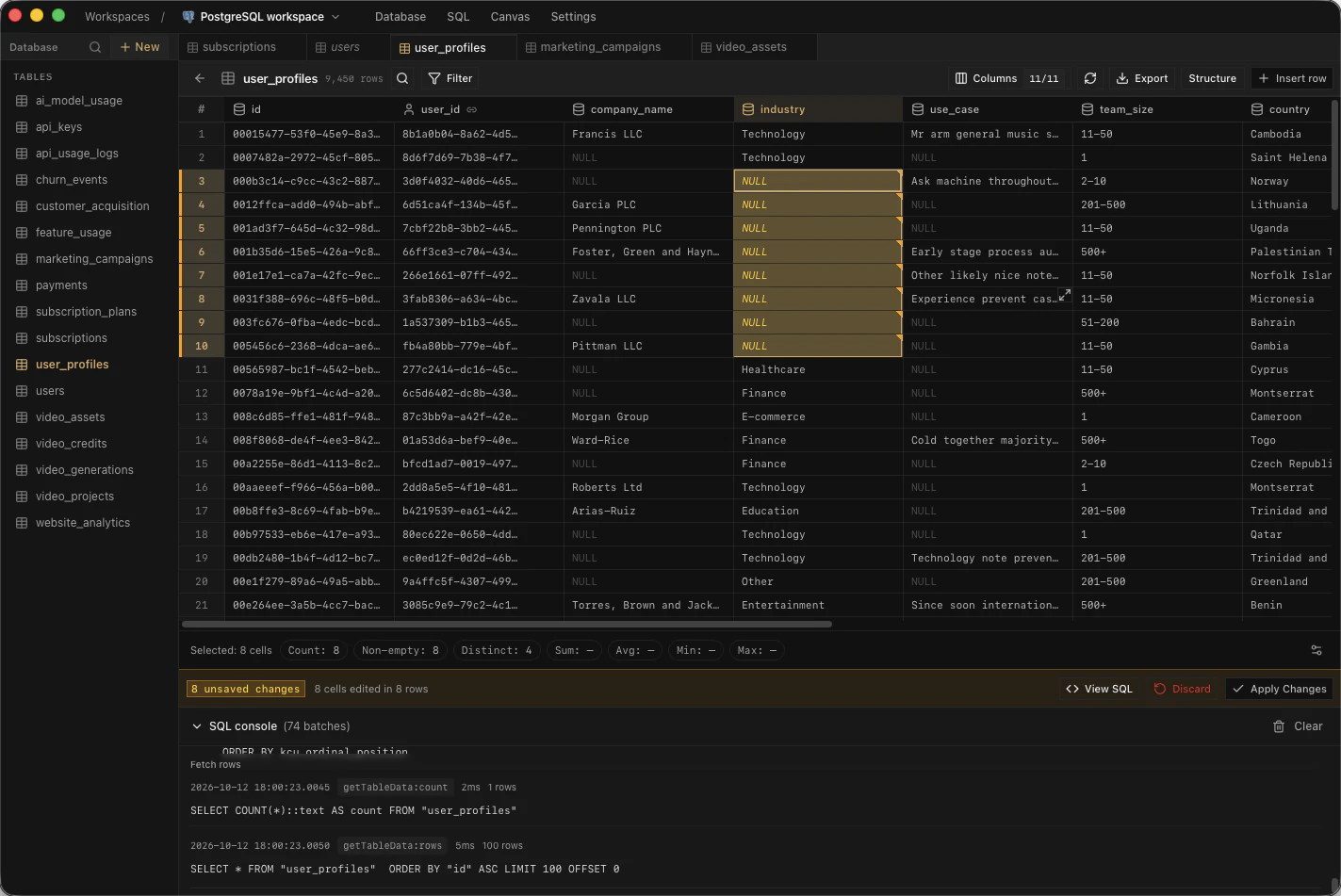
TablePad table grid with eight staged edits in user_profiles, selection stats and the Apply Changes bar
  • Review before you apply

    Open the exact SQL behind your edits, discard them, or apply every update, insert and delete in one transaction.

  • Filters without the syntax

    Stack conditions and sort any column, or type a raw WHERE clause when that's faster.

  • Relationships, one click away

    Peek at the row a foreign key points to and open JSON cells in a real inspector, without leaving the grid.
02SQL editor

SQL that knows your schema.
And remembers every run.

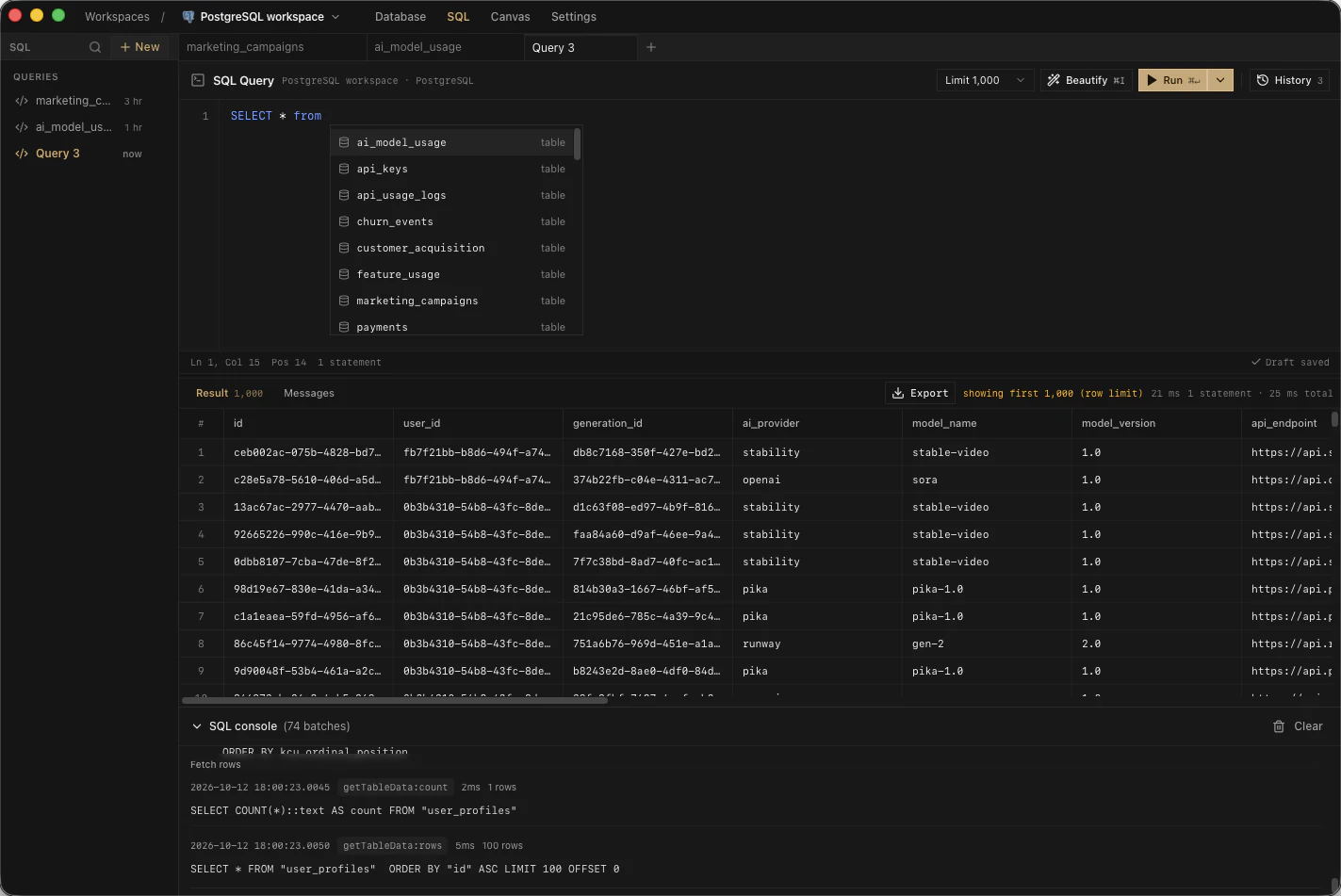
A multi-tab editor that completes tables and columns as you type, runs the statement under your cursor or the whole script, and saves your drafts as you go.

TablePad SQL editor suggesting table names as you type, above a 1,000-row result grid and the SQL console
  • Autocomplete from the live schema

    Table and column suggestions come from the database you're connected to, table.column included.

  • History, limits and Beautify

    Reopen any past run, cap results with a row limit so a stray SELECT * stays quick, and tidy up with ⌘I.

  • Every statement on the record

    The SQL console logs each query with its timing and row count. Export results as CSV, TSV, JSON or SQL INSERT.

03AI canvas

Documents that query themselves.
Answers you can check.

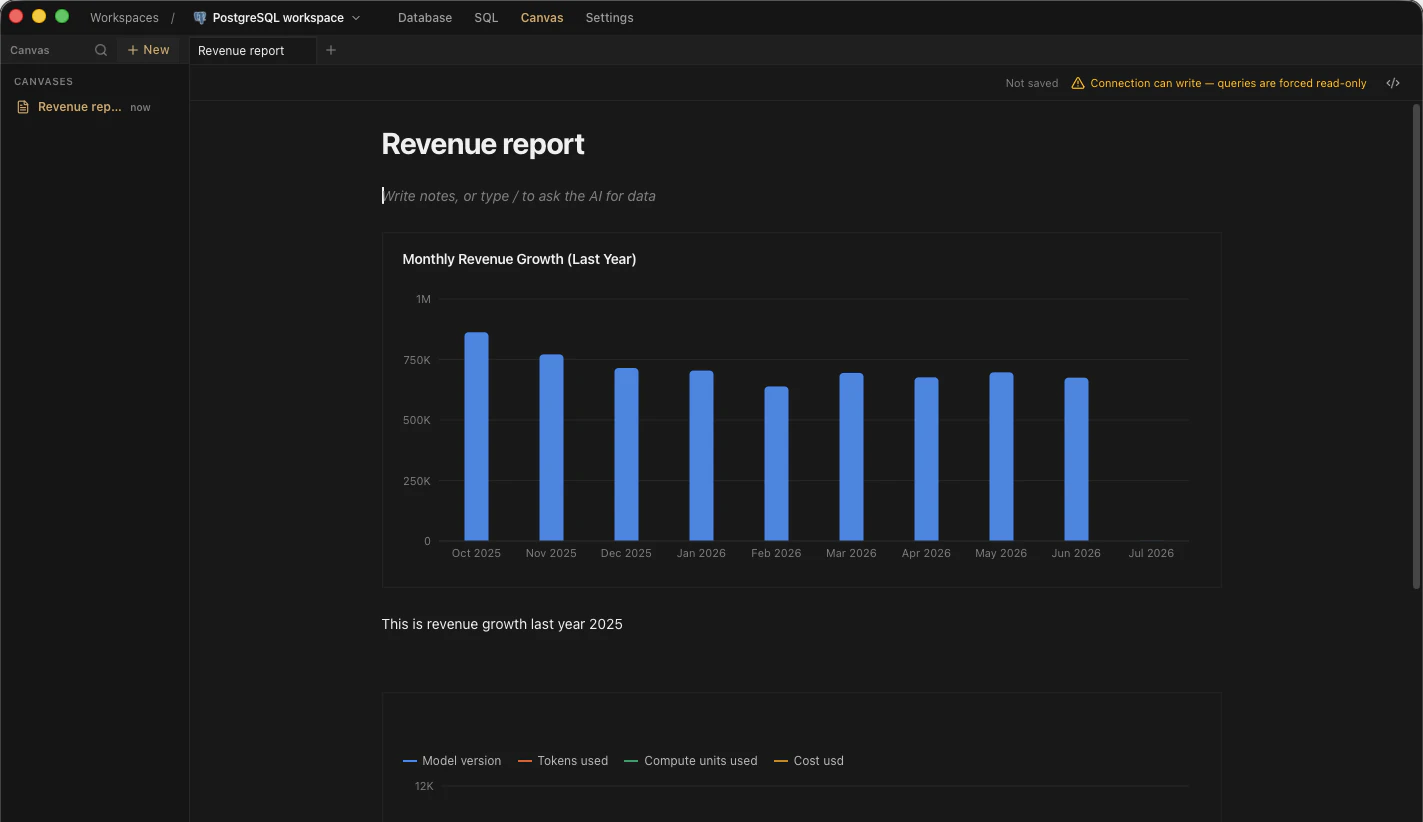
Write notes beside live query blocks and charts. Type / to ask the AI analyst for data — it explores your schema, writes the SQL and shows its work.

TablePad canvas titled Revenue report with a live monthly revenue bar chart and notes
  • Ask in plain language

    The analyst works through Explore → Query → Transform → Verify, with every SQL step in view.

  • Charts from real results

    Bar, line, area, pie, funnel and scatter charts or stat cards, plus pinned, parameterized queries you can re-run.

  • Read-only, always

    Canvas queries are forced read-only. Even on a connection that can write, a canvas can't change your data.

Bring your own key

Your key. Your provider.
No middleman.

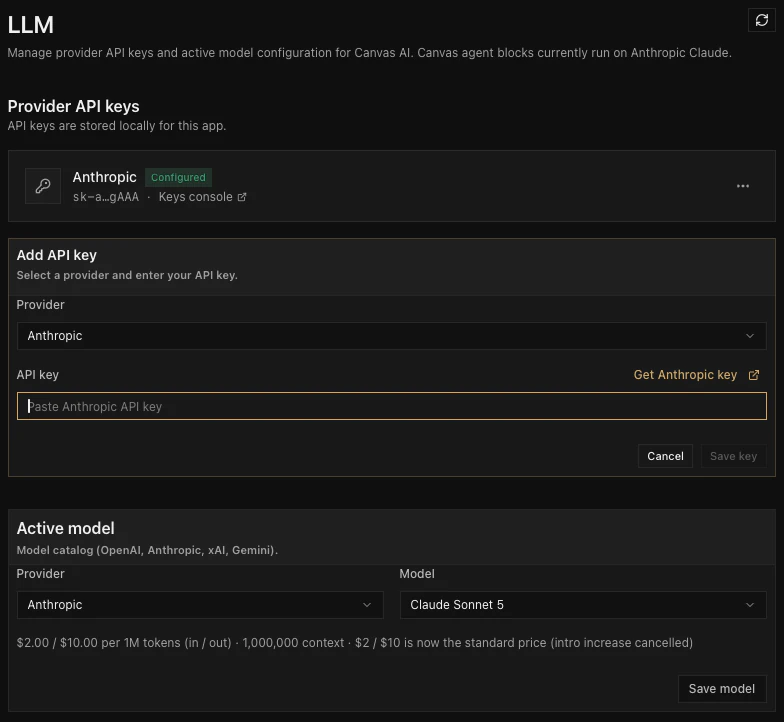
TablePad doesn't resell AI or route it through a server of ours. Paste your own Anthropic API key and canvas requests go straight from your Mac to Anthropic — billed by them, at their price.

  • Your key is stored locally, on this Mac only
  • Requests go direct — TablePad never sees prompts or answers
  • Columns you mark sensitive are masked before any sample reaches the model
  • Pick the Claude model and see its token price before you save
TablePad LLM settings: a configured Anthropic API key, the add API key form, and the active Claude model with its token price

Everything around it, built in.

From connecting a database to finding it again next week.

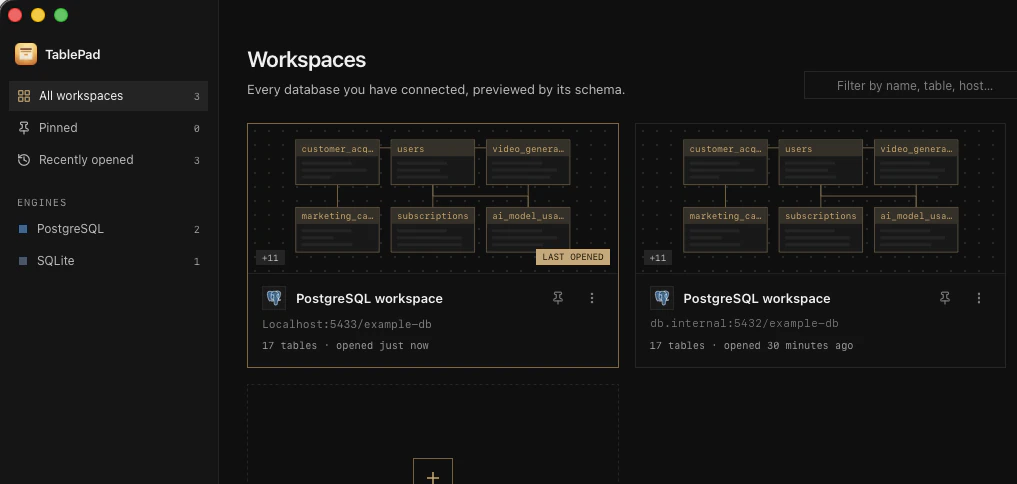
Every database at a glance

Each workspace is previewed by its own schema. Pin the ones you live in, filter by name, table or host, and pick up where you left off.

TablePad workspaces home with each connected database previewed by its schema

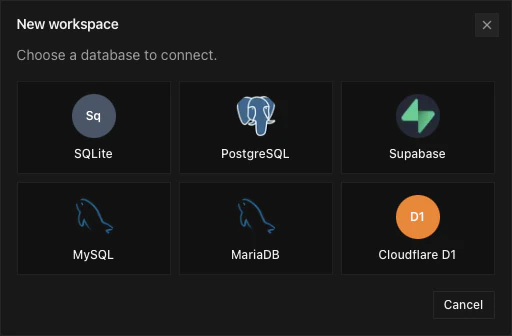
Connected in a few clicks

Pick an engine, enter the details and test the connection before anything is saved.

New workspace dialog listing SQLite, PostgreSQL, Supabase, MySQL, MariaDB and Cloudflare D1

Connect what you already run.

Local files or production clusters. TablePad connects directly from your Mac — test the connection, name the workspace, and start browsing.

  • PostgreSQL
  • MySQL
  • MariaDB
  • SQLite
  • Supabase
  • Cloudflare D1

Small to install. Always current.

43.6 MB download

The installer is a small native launcher. The rest of the app arrives on first launch.

Updates itself

New versions install when you open TablePad, each one verified with an Ed25519 signature.

Works offline

After the first launch the app runs from its local copy, so SQLite files and databases on your network keep working without internet.

Get TablePad for desktop

Free for Mac (Apple Silicon) and Windows. Windows code signing is still in progress — the download page explains the SmartScreen warning before you install.

Download

app v0.1.9

  • macOS 11.0 or later · Apple Silicon (M1 or newer)
  • Windows 10 or later