
Your AI data assistant doesn't need to see your customers' rows
The model can write the queries without ever seeing the answer. Here's exactly what an AI agent in a database tool needs, how to mask the rest, why masking by column name breaks on a simple alias, and what still leaks.
Most "chat with your database" features work like this: the model writes a query, the app runs it, and the result rows go back to the model so it can write a friendly answer. That last step means every question ships a slice of your customer table to a third-party API.
You don't need it. The model's job is to write the right queries. Reading the answer is the person's job, and the person is already looking at the screen.
I build TablePad, a database client with a canvas where an AI agent answers questions as a chain of small SQL steps. This post is an honest inventory of what our agent sees, how the rest is masked, the hole I found in our masking while writing this, and what still leaks no matter what.
Split the work: the model plans, the app runs, the person reads
The agent never asks for results to summarize. It writes one step, the app runs it and shows the rows to the person, and the model gets back only what it needs to write the next step. For the step that holds the final answer, the model gets no values at all. This is the literal text it receives:
Result: 7 rows; columns: order_id, name, country, status, ordered_at, shipped_at
Values withheld — the final result is shown to the user only.
Column kinds: order_id:number, name:text, country:text, status:text, ordered_at:date, shipped_at:date
That's enough to finish the job: pick a chart or a table, map the columns, and write the title. A bar chart doesn't need to know the bars' heights.
What the model does need
Here is everything that reaches the model in a run, in order of how much it matters.
| What | Why it's needed | Contains row data? |
|---|---|---|
| Schema: tables, columns, types, primary and foreign keys | To write valid SQL at all | No, but names can be sensitive |
| Schema notes written by your team | Business meaning the schema can't express | Only if someone typed it |
| The request text | It's the question | If the person typed a customer's email, yes |
| Saved queries related to the request | "Follow how this team does it" | Literals in the SQL |
| Each step's code, row count and column names | To chain steps and notice when one is wrong | Row counts |
| A few sample rows from intermediate steps | To see real value shapes | Yes, with sensitive columns masked |
| Database error messages | To fix the failed step | Sometimes they quote a value |
The row that needs defending is the samples. The agent gets up to 20 rows from an explore query and 5 from other intermediate steps. Why send any?
Because the most common way an agent goes wrong is guessing what values look like. Is the status 'Delivered', 'delivered' or 3? Is ordered_at a date or a timestamp string? In our sample store it's a string like 2026-03-14T09:12:00Z, and WHERE ordered_at = '2026-03-14' quietly returns nothing. A 20-row SELECT DISTINCT status FROM orders answers those questions better than any amount of prompting. So the job is to let shapes through while keeping identities out.
Masking that keeps the shape
Sensitive values are replaced before anything is sent, and the replacement keeps the type and length:
export function maskValue(value: unknown): unknown {
  if (value === null || value === undefined) return value ?? null;
  if (typeof value === 'number') return '‹masked number›';
  if (typeof value === 'string') return `‹masked text, ${value.length} chars›`;
  return '‹masked›';
}
‹masked text, 23 chars› still tells the model "this is a non-empty string about as long as an email address". That's usually enough to write the next step: it knows the column is filled in and what kind of value it holds, without knowing whose it is.
Which columns count as sensitive? Nobody fills in a settings page before trying a feature, so the default comes from column names: email, phone, name, address, zip, ssn, passport, birthdate, password, token, api_key, card_number, iban, ip_address, lat/lng, and more. Those are pre-checked as suggestions, and the person decides from there:
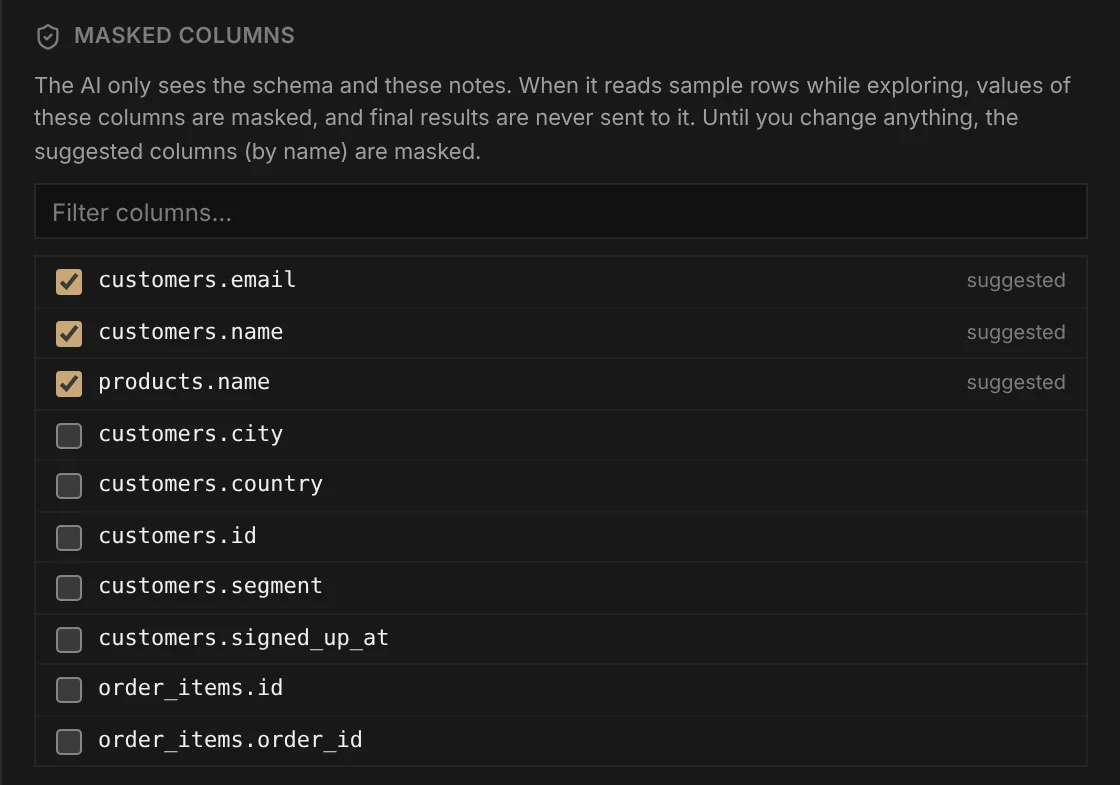
The screenshot shows both ways a name heuristic goes wrong:
- Over-masking:
products.namematchesname, so product names get masked too. That's the safe direction. It costs a little context, and the person can uncheck it. - Under-masking:
customers.cityandcustomers.countrydon't match anything. A city plus a signup date can identify someone in a small dataset. The heuristic gives you a starting point, not a classification.
The alias hole
While writing this post I tried the obvious attack on masking by name:
SELECT c.email AS contact FROM customers c LIMIT 5;Masking matched result columns by name, and the result column is now called contact, so the emails would have gone through untouched. The model isn't usually trying to exfiltrate anything. But it writes aliases all the time for perfectly good reasons, and text inside the data can try to steer it.
The fix is to mask by where a column comes from, not what it's called. Both drivers I tested can tell you that:
better-sqlite3  stmt.columns()
  contact → customers.email      e2 (lower(email)) → null      total → orders.total

node-postgres  result.fields[i].tableID / columnID, resolved through pg_attribute
  contact → customers.email      e2 (lower(email)) → null      total → orders.total
In SQLite, stmt.columns() returns table and column for each result column. In Postgres, each field in the row description carries the source table's OID and the column number. One query against pg_attribute turns those into customers.email. Then the rules are:
- A result column whose origin is a sensitive column is masked, whatever its alias.
- A result column with no origin (an expression such as
lower(email),concat(…)orleft(…)) is masked if the step's SQL reads any sensitive column at all. You can't prove an expression is safe, so don't try. - Keep matching by name as a fallback, for drivers and databases that can't report origins.
It costs one catalog lookup per new result shape, and the shapes repeat.
Write the knowledge down once
Every explore query exists because the model didn't know something. The cheapest privacy improvement is to make it ask less. Schema notes are a short, human-written page sent with every request:
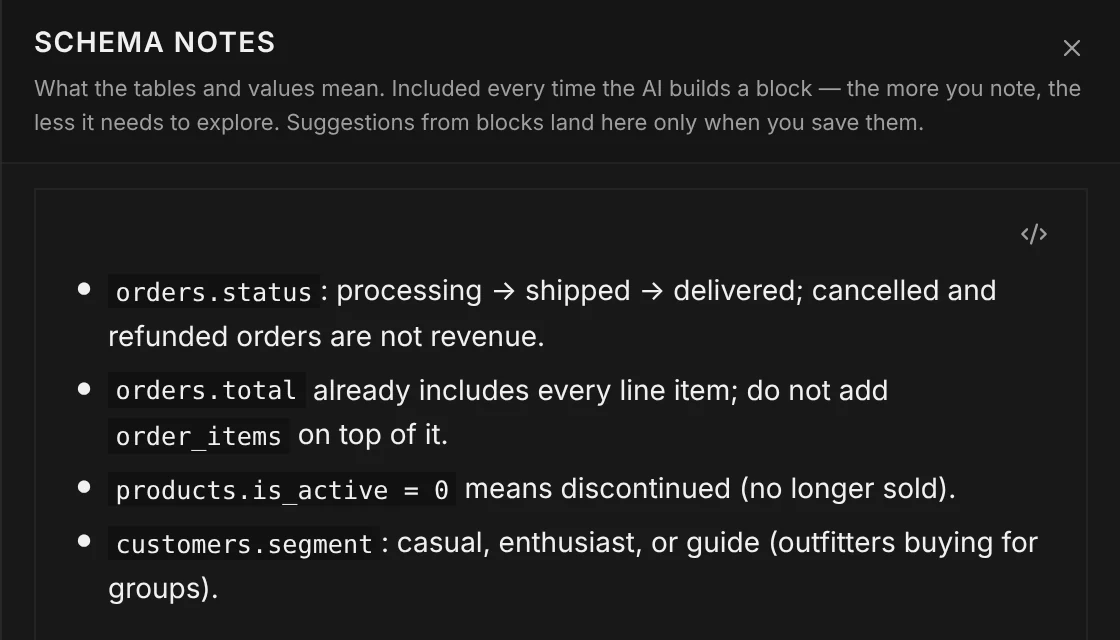
The agent also proposes notes: facts its explore queries just verified, such as "orders.status: processing → shipped → delivered". They're only saved when a person approves them. Over time, runs need fewer samples because the answers are already written down.
What still leaks, whatever you do
If you ship one of these features, put this list in your docs:
- The schema. A column called
hiv_statusoris_under_investigationtells a story without a single row. - The question. "Why did jane.doe@acme.com's order fail?" sends that email address. Masking can't help with text the person typed.
- Saved queries. Reusable queries are sent as examples, including any literals they still contain.
- Counts. "How many patients match X" can be sensitive on its own.
- Error messages. Some database errors quote the offending value.
- Unmasked columns in samples, by definition.
And give people a way to check. TablePad keeps a usage log with the full text of every request and response sent to the model, so "what did the AI see?" has an answer you can read rather than one you have to trust.
A checklist
- Don't send final results to the model. Send column names and kinds.
- Send a few sample rows from intermediate steps, and only because value shapes matter.
- Mask by origin (
tableID/columnID,stmt.columns()), not by result column name, and mask expression columns that read sensitive data. - Keep the shape in the mask: type and length.
- Default the sensitive list from names, then let people change it.
- Invest in schema notes so the agent explores less.
- Log exactly what was sent, and show it to the people whose data it is.
- Use the customer's own API key where you can, so the data goes to a provider they chose, under their own terms.