
Your read-only Postgres transaction isn't as read-only as you think
I ran 15 statements inside BEGIN READ ONLY on Postgres 16. Most writes were blocked. A dblink call still committed an UPDATE, an advisory lock outlived the rollback, and another session got killed.
I build TablePad, a database client. One part of it, the canvas, lets an AI agent answer questions by writing SQL that runs against your database. It runs with the credentials you connected with, and in practice that is often a role that can write.
So the first guardrail I reached for was the obvious one: run every agent query inside BEGIN READ ONLY. Postgres then refuses writes, and I'm done.
I wasn't done. Before trusting it, I wrote a small script that opens a read-only transaction and tries things in it. It ran 15 statements against Postgres 16.15, as an ordinary role that owns the tables. That's the kind of role most apps connect with. Here is what happened.
What BEGIN READ ONLY blocked, and what it didn't
Each statement ran in its own connection as BEGIN READ ONLY; SET LOCAL statement_timeout = 15000;, followed by the statement and then ROLLBACK.
| Statement | Result |
|---|---|
INSERT INTO reviews … |
Blocked |
WITH d AS (DELETE … RETURNING *) SELECT … |
Blocked |
SELECT … FOR UPDATE / FOR SHARE |
Blocked |
nextval('invoice_seq'), setval(…) |
Blocked |
CREATE TEMP TABLE scratch (…) |
Blocked |
set_config('transaction_read_only', 'off', true) |
Blocked: "transaction read-write mode must be set before any query" |
lo_create(0) |
Blocked |
pg_read_file('/etc/hostname') |
Permission denied for this role. Ran for a superuser. |
pg_sleep(3) |
Ran for 3 seconds |
pg_notify('orders', 'hello') |
Ran, but notifications are only sent on commit, so the rollback dropped it |
pg_advisory_lock(42) |
Ran, and the lock was still held after ROLLBACK |
pg_terminate_backend(<another session's pid>) |
Ran, and the other session's connection was killed |
dblink_exec('…', 'UPDATE products SET price = 1 WHERE id = 1') |
Ran, and the UPDATE was still there after ROLLBACK |
The top half is reassuring. Postgres takes read-only seriously: it even refuses nextval(), because advancing a sequence is a write. The bottom half is the part that matters.
What "read-only" means to Postgres
A read-only transaction stops that transaction from changing data in this database. That's what the documentation promises, and it's all it promises. The rows that ran all have side effects that live somewhere else.
Another connection. dblink_exec opens a new connection and runs its SQL there, in that connection's own transaction, which isn't read-only and commits on its own. Your rollback has nothing to undo. To do this as a regular role, dblink needs a password in the connection string, so the SQL would have to contain one. But dblink is a common extension (hosted platforms such as Supabase offer it with one click), and its functions are executable by PUBLIC by default. I checked the ACL on a fresh install: dblink_connect_u is restricted, dblink_exec is not.
The session, not the transaction. pg_advisory_lock takes a session-level lock. Rolling back the transaction doesn't release it. If your tool uses a connection pool, that connection goes back to the pool still holding lock 42 until someone calls pg_advisory_unlock or the connection closes. Migration tools take advisory locks too. Prisma Migrate and Rails both do.
Other sessions. A role may terminate backends that belong to the same role. If the agent connects with the same credentials as your production app, pg_terminate_backend can kill your app's connections.
Time. pg_sleep and its cousins can't write anything, but they hold a connection and a snapshot for as long as you let them.
Files, for superusers. pg_read_file and pg_ls_dir are permission checks, not write checks. A local dev database where you connect as postgres will read files from the server's disk inside a read-only transaction.
None of this is a Postgres bug. A read-only transaction just answers a narrower question than the one I was asking.
The fix that actually works: a role that can't
If the credentials can't do something, no clever SQL can make them. This is the role I'd now give any agent, BI tool or "chat with your database" feature. I ran the same probes against it:
CREATE ROLE ai_reader LOGIN PASSWORD '…';
GRANT CONNECT ON DATABASE shop TO ai_reader;
GRANT pg_read_all_data TO ai_reader;      -- Postgres 14+: SELECT on everything
ALTER ROLE ai_reader SET statement_timeout = '15s';
ALTER ROLE ai_reader SET idle_in_transaction_session_timeout = '30s';
ALTER ROLE ai_reader CONNECTION LIMIT 5;

-- If dblink is installed: it is executable by PUBLIC by default.
REVOKE EXECUTE ON FUNCTION dblink_exec(text) FROM PUBLIC;
REVOKE EXECUTE ON FUNCTION dblink_exec(text, text) FROM PUBLIC;
REVOKE EXECUTE ON FUNCTION dblink_exec(text, boolean) FROM PUBLIC;
REVOKE EXECUTE ON FUNCTION dblink_exec(text, text, boolean) FROM PUBLIC;
Probe as ai_reader |
Result |
|---|---|
INSERT (no transaction at all) |
permission denied for table reviews |
dblink_exec(…) |
permission denied for function dblink_exec |
pg_terminate_backend(<app session>) |
permission denied to terminate process |
pg_sleep(20) |
canceled after 15 s by the role's statement_timeout |
pg_advisory_lock(42) |
still ran |
Two notes. First, don't count on ALTER ROLE … SET default_transaction_read_only = on. A session can just run SET default_transaction_read_only = off. I tried, and it worked. It's a default, not a permission. Second, advisory locks are executable by PUBLIC too, and revoking them from PUBLIC would also take them away from your app's migrations. So I leave those functions alone in the role and block them in the query guard.
If you can, point the role at a read replica. That ends the conversation about writes, and heavy queries land somewhere they can't slow down production.
You can't always choose the role, so add layers
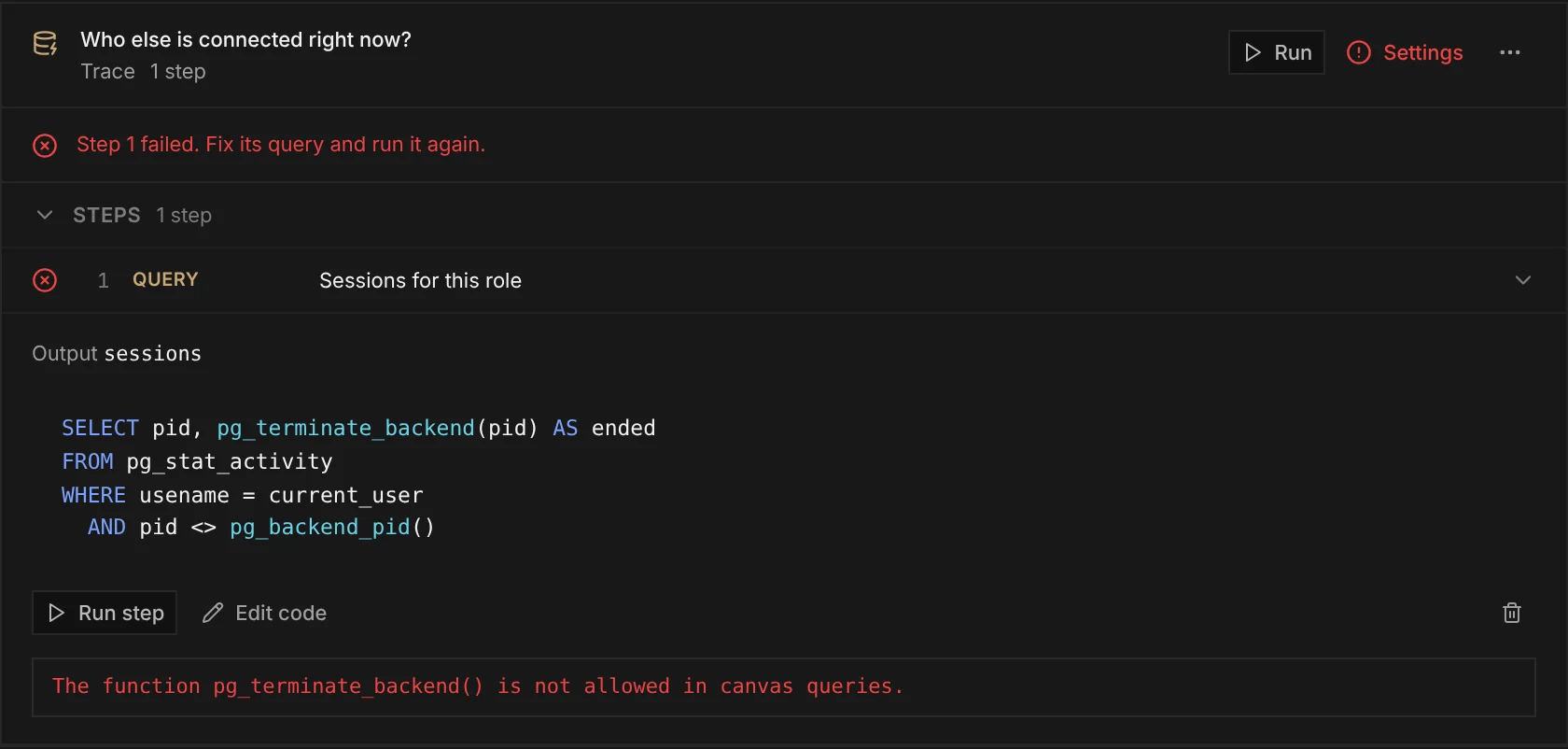
A desktop database client doesn't get to pick its users' credentials. People connect with whatever they have, and that's often an owner or a superuser. So TablePad checks what the connection can do and tells you. It checks for superuser, default_transaction_read_only, whether the server is a replica, and how many tables the role can write to. Then it runs every agent query through these layers:
- A tokenizer check before anything reaches the database. One statement only. It must start with
SELECT,WITH,VALUESorTABLE. Words likeINSERT,UPDATE,DELETE,MERGE,INTO,DROP,ALTER,CREATE,TRUNCATE,GRANT,ATTACHandPRAGMAare rejected, and so isFOR SHARE. A denylist covers functions that act outside the transaction:pg_terminate_backend,pg_cancel_backend,pg_sleep, the advisory lock family,dblink*,lo_*,pg_read_file,pg_ls_dir,set_config,nextval,setval, and a few more. It's a tokenizer and not a regex, soWHERE note = 'please update my address'passes. That's a string literal, not a keyword. - The read-only transaction with a transaction-local timeout:
BEGIN READ ONLY; SET LOCAL statement_timeout = 15000. - A cost estimate before running.
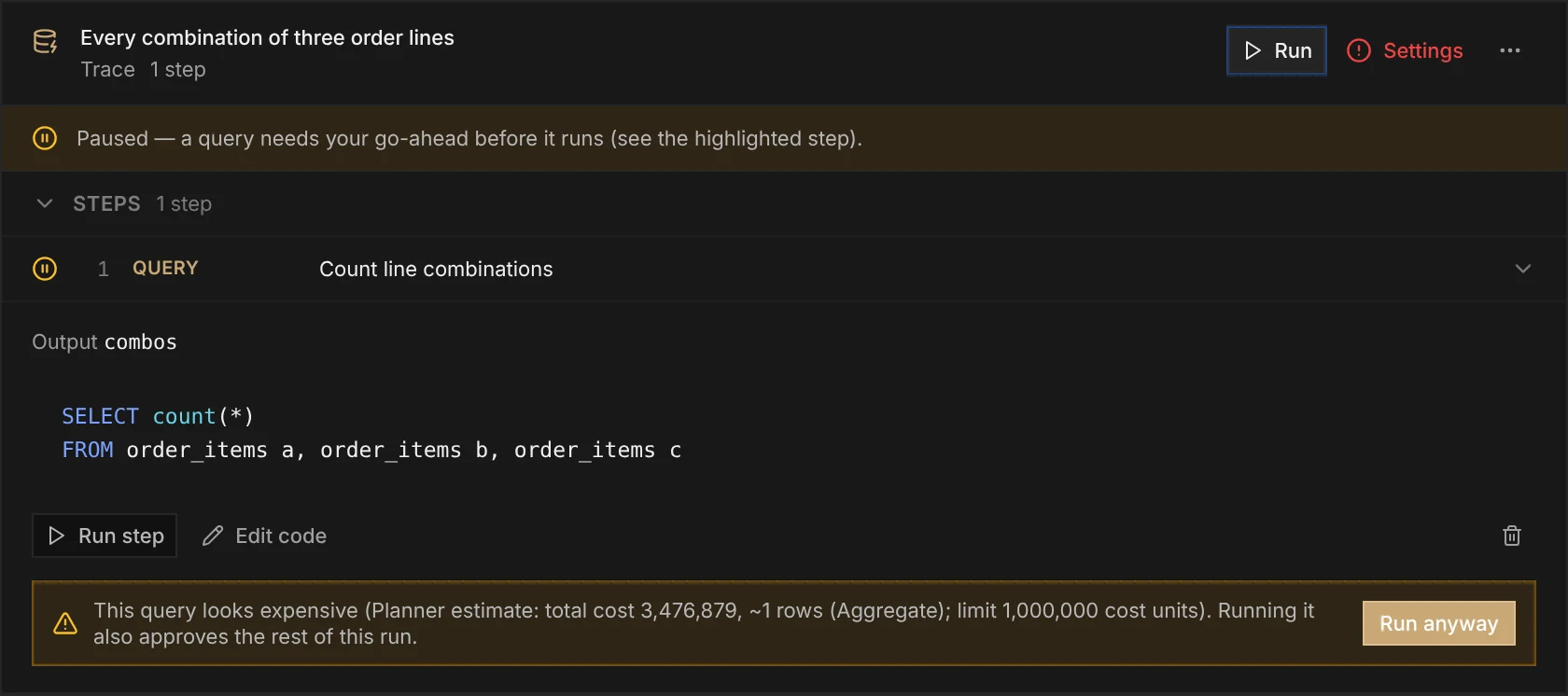
EXPLAIN (FORMAT JSON)runs in the same transaction, and if the planner's total cost is above 1,000,000, the query waits for a person to approve it. - A row cap. The query is wrapped as
SELECT * FROM (…) LIMIT 1001, and the true count is fetched separately only when the result was cut off. - Always roll back. If the
ROLLBACKitself fails, the connection is thrown away instead of returned to the pool. - Every query is shown to the person, including the check queries the app runs on its own.
Each database needs its own version of layer 2. In MySQL it's MAX_EXECUTION_TIME on the session. SQLite has no server to cancel a query on, and better-sqlite3 can't interrupt a running statement. So there the query runs in a short-lived child process on a read-only file handle, and on timeout the process is killed.
The hole I found in my own guard while writing this
Denylists rot from the edges. While putting together the probes above, I tried one more:
SELECT "pg_sleep"(3);Quoted identifiers are still identifiers. "pg_sleep" is the same function as pg_sleep, and my tokenizer only compared plain words against the denylist. A quoted identifier is a different token type, so it went straight through. The same trick works with "dblink_exec", and on a database where dblink is installed, that puts you right back at the first table.
The fix is small. When the token before a ( is a quoted identifier, unquote it and check that name too:
function calledFunctionName(token: SqlToken, next: SqlToken | undefined): string | null {
  if (next?.text !== '(') return null;
  if (token.type === 'word') return token.text.toLowerCase();
  if (token.type === 'quoted-identifier') {
    // Quoted names are case-sensitive, so this can over-block "PG_SLEEP". That's fine;
    // under-blocking "pg_sleep" is not.
    return token.text.slice(1, -1).replace(/""/g, '"').toLowerCase();
  }
  return null;
}
The bigger lesson is the one this whole post keeps arriving at. The tokenizer is a speed bump that catches honest mistakes and makes the error message useful. The read-only transaction is a seatbelt. The role is the wall. If you can only have one, have the role.
A checklist you can take
- Give agents and BI tools their own role with
pg_read_all_data, not your app's credentials. That alone makespg_terminate_backendharmless. - Set
statement_timeout,idle_in_transaction_session_timeoutand aCONNECTION LIMITon the role, where a session can't argue with them. REVOKE EXECUTE … FROM PUBLICondblink_execif dblink is installed, and on any other extension function that reaches outside the database.- Prefer a read replica.
- Still wrap queries in
BEGIN READ ONLYwithSET LOCAL statement_timeout. It's cheap, and it blocks the common cases with clear error messages. - If you filter SQL text, use a tokenizer, check quoted identifiers and schema-qualified names, and treat the filter as a convenience, not a boundary.
- Never send connections back to a pool without a successful
ROLLBACK, and remember that session-level state such as advisory locks andSET(withoutLOCAL) survives it.
The probe script is about 50 lines of Node with pg. Point it at a staging database with the credentials your tool actually uses. It takes a minute, and you'll know which half of the first table you're in.